SPIRE on Talos, and a Vault Login Without a Secret
On this page
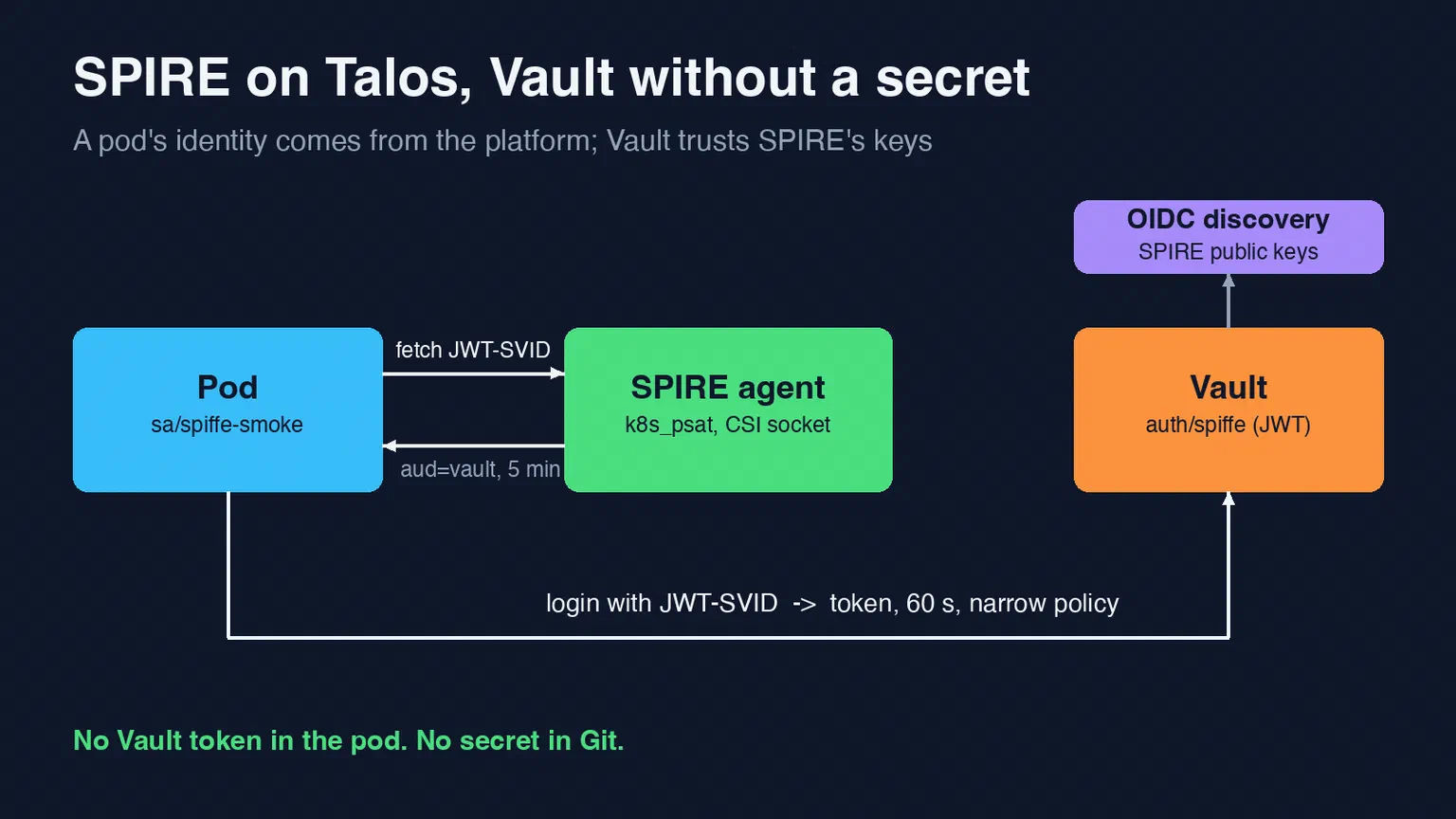
The design in part 1 rests on one assumption: a pod can prove who it is without anyone handing it a secret first. That’s what SPIRE does. This part covers the first real step of the build. We installed SPIRE on our non-production Talos cluster, then let a pod log in to Vault with nothing but the identity SPIRE gave it.
Both work. Getting there took two small detours, which are below.
What we installed #
SPIRE comes as a Helm chart from the SPIFFE project. We pinned chart 0.31.0, which ships SPIRE 1.16.0, plus the separate spire-crds chart. Flux installs both from our GitOps repository, like every other controller on the cluster.
The values that matter:
global:
  spire:
    trustDomain: nonprod.bsdserver.lan
    jwtIssuer: https://spire-oidc-nonprod.bsdserver.nl
    recommendations:
      enabled: true

spire-server:
  dataStore:
    sql:
      databaseType: sqlite3
  caTTL: 24h
  defaultX509SvidTTL: 1h
  defaultJwtSvidTTL: 5m
  controllerManager:
    identities:
      clusterSPIFFEIDs:
        default:
          enabled: true
          namespaceSelector:
            matchLabels:
              spiffe.io/enabled: "true"

spire-agent:
  kubeletAddress:
    mode: hostip

spiffe-oidc-discovery-provider:
  enabled: true
A few choices in there are worth explaining.
The version is exact. We normally let Flux follow a minor range. This chart’s minor releases have changed value names before, so it gets a fixed version and an upgrade is a deliberate change.
Identities are opt-in. The chart’s default ClusterSPIFFEID gives every pod an identity of the form spiffe://<trust domain>/ns/<namespace>/sa/<service account>. We limited it to namespaces with the label spiffe.io/enabled=true. A pod in any other namespace gets nothing from SPIRE, even though the agent runs on every node.
Short lifetimes. X.509 certificates last an hour and JWTs five minutes. The agent renews them on its own, so short lifetimes cost nothing.
SQLite is fine here. This cluster has a single node. The production SPIRE server will use PostgreSQL. That’s for a later part.
The agent doesn’t need host networking. It has to reach the kubelet to check which pod is asking for an identity. With kubeletAddress.mode: hostip it uses the node’s IP from the downward API instead of 127.0.0.1, so the agent pod stays off the host network.
Pod security #
Talos enforces Pod Security Admission. The SPIRE agent and the CSI driver need host paths, so their namespace, spire-system, runs at the privileged level. The server runs in its own namespace, spire-server, at restricted. We create both namespaces ourselves, with those labels, and tell the chart not to create them.
How a pod gets its identity #
Workloads don’t talk to the agent over a host path. The chart includes the SPIFFE CSI driver, which mounts the agent’s Workload API socket into the pod as a read-only volume:
volumes:
  - name: spiffe-workload-api
    csi:
      driver: csi.spiffe.io
      readOnly: true
The pod needs no privileges for this. It asks the socket for a certificate or a JWT. The agent looks up the calling process, checks with the kubelet which pod and service account it belongs to, and answers only if a registration matches.
The OIDC discovery endpoint #
Anything that verifies a JWT-SVID needs SPIRE’s public keys. The chart’s OIDC discovery provider publishes them as a standard /.well-known/openid-configuration and a JWKS. That makes SPIRE look like any other OpenID Connect issuer, which is exactly what Vault’s JWT auth method expects.
We exposed it on spire-oidc-nonprod.bsdserver.nl through our ingress, with a Let’s Encrypt certificate and an allow-list for the LAN, the cluster networks and our NetBird mesh. The public certificate means Vault can fetch the keys without a custom CA bundle. The endpoint only serves public keys, but it still isn’t reachable from the internet.
One thing caught us later. Pods inside the cluster can’t use that hostname, because the ingress allow-list doesn’t include pod addresses. Anything in-cluster that needs the keys reads them from the provider’s Service directly. That comes up again in the next part.
Vault login with a JWT-SVID #
Vault Enterprise has a native SPIFFE auth method. We run Vault Community, which doesn’t. It does have the JWT auth method, and a JWT-SVID is a normal signed JWT. So the plan was a JWT auth mount that trusts SPIRE’s discovery endpoint.
Our Vault is configured with Terraform through a shared module. That module already managed one JWT mount, for GitLab CI, but it couldn’t create a second one. So the first change was to the module: a new jwt_auth_backends input, released as v2.6.0, with tests for the new input.
The unit that uses it is short:
inputs = {
  jwt_auth_backends = {
    spiffe = {
      description        = "SPIFFE JWT-SVID login, trust domain nonprod.bsdserver.lan"
      oidc_discovery_url = "https://spire-oidc-nonprod.bsdserver.nl"
    }
  }

  jwt_roles = {
    spiffe-smoke = {
      backend         = "spiffe"
      bound_audiences = ["vault"]
      bound_claims = {
        sub = ["spiffe://nonprod.bsdserver.lan/ns/mcp-dev/sa/spiffe-smoke"]
      }
      user_claim     = "sub"
      token_policies = ["default"]
      token_ttl      = 60
      token_max_ttl  = 60
    }
  }
}
Each role is bound to exactly one SPIFFE ID and to the audience vault. A workload that wants to log in asks SPIRE for a JWT-SVID with that audience and hands it to Vault. Vault checks the signature against SPIRE’s keys, the issuer, the audience and the sub claim. If all of it matches, the workload gets a Vault token with that role’s policy.
One mount per trust domain. Vault’s JWT method trusts one issuer per mount. This mount belongs to the non-production trust domain. Production will get its own mount rather than a second issuer here, so a non-production identity can never be mapped to a production policy by accident.
The first detour: one grant was too narrow #
Our Terraform runs with an AppRole whose policy lists exactly what it may touch. We granted it the new mount’s paths, including sys/mounts/auth/spiffe. The first apply created the mount and then failed with a 403.
The Vault provider reads the mount’s tuning at sys/mounts/auth/spiffe/tune, one level deeper than the grant. Nothing used the mount yet, so recreating it was harmless. The fix was a grant that covers the subpath. It’s the kind of failure you only find by applying.
Testing it #
We tested on a throwaway Vault in dev mode first, so we could try things that should fail. With a real JWT-SVID from a test pod:
| Attempt | Result |
|---|---|
Correct role, audience vault | Logged in, default policy |
| JWT-SVID with a different audience | Refused |
| The role of another workload | Refused: sub doesn’t match the bound claim |
| Payload changed to another SPIFFE ID, signature kept | Refused: signature invalid |
Then on the production Vault, from a pod running under the spiffe-smoke service account:
T=$(spire-agent api fetch jwt -audience vault \
      -socketPath /spiffe-workload-api/spire-agent.sock | awk '/token\(/{getline; print $1; exit}')
vault write auth/spiffe/login role=spiffe-smoke jwt="$T"
The login returned a token with only the default policy, valid for 60 seconds. A read under secret/ with that token returned 403, as intended. The pod never held a Vault credential. Its identity came from the platform, and the token it got from Vault expires a minute later.
What this doesn’t solve yet #
SPIRE uses its own CA on this cluster. In production we want its signing key to come from Vault’s PKI engine. SPIRE then needs one credential to talk to Vault. So the number of secrets goes from many to one, not to zero. We’d rather be honest about that than pretend otherwise.
The other open part is real policy. spiffe-smoke exists only to prove that the login path works. The MCP servers get their own roles in phase 2, each bound to one service account and allowed to read only its own credentials.
Next #
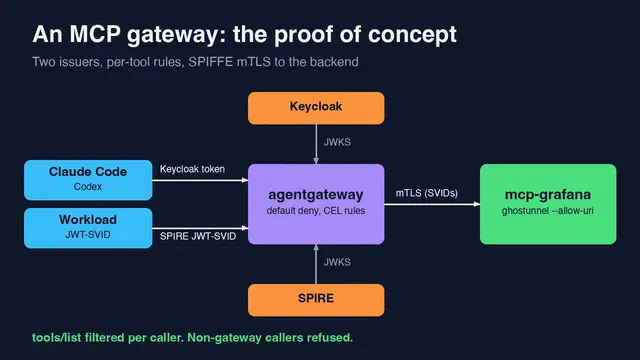
With identities in place, the next part puts a gateway in front of an MCP server. Workloads use these JWT-SVIDs, people sign in with Keycloak, and every MCP server accepts only the gateway. It’s also where we got an OAuth detail wrong before getting it right.
Get new posts by email
One mail when a new article goes live: what it covers and a link. No tracking pixels, unsubscribe in one click.
Related articles
Designing a Self-Hosted MCP Gateway for Every AI Client
Our MCP servers move to Kubernetes behind one gateway. Keycloak OAuth for people, SPIFFE for workloads, and no public endpoint.
Six MCP Servers, and No Secret in Any Client
Phase 2 of our MCP platform. Six MCP servers on Talos get their credentials from Vault with their SPIFFE identity, and the AI clients keep no tokens …
An MCP Gateway With Keycloak and SPIFFE: the Proof of Concept
agentgateway in front of an MCP server on Talos. SPIRE JWT-SVIDs for workloads, Keycloak OAuth for people, mTLS to the backend, and one issuer …